Adhese API
This section details available Adhese API's.
- Where to find the Adhese APIs
- How to get Access to the API
- Campaign API
- Media Partners API
- User Mappings API
- API Manuals
- Booking API
Where to find the Adhese APIs
API Usage
This page provides info on where to find detailed explanation on the Adhese APIs. See this guide on how to gain access to the APIs. It is intended as a starting point for developers and users who need to integrate with the API.
Adhese stores its detailed API documentation in Swagger. Next to the documentation on Swagger, there will be explanations on every endpoint here on our documentation platform.
Capabilities of Swagger
-
Data retrieval – fetch structured data from the system.
-
Data submission – send and store data on the platform.
-
Schema definition – provides information on request/response objects, parameters, query strings, and headers.
-
Configuration access – interact with specific configurations and settings.
-
Monitoring & Diagnostics – review statuses, logs, and operational information.
-
“Try It Out” feature – execute real API requests directly from the UI.
For full details on all endpoints, see the Swagger UI.
Where to find endpoints
All available endpoints are documented in Swagger:
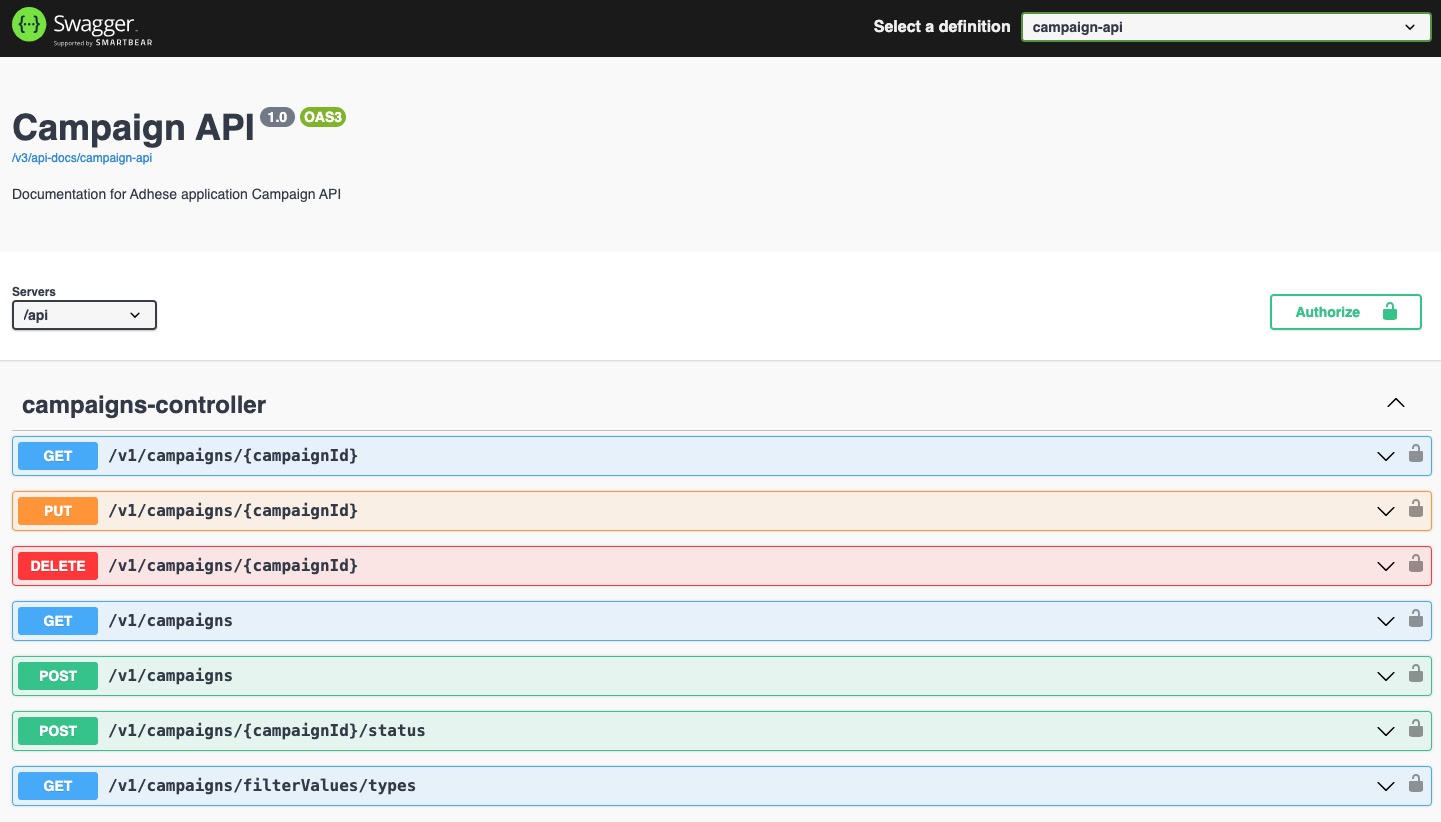
The Swagger UI allows you to:
-
Browse the list of endpoints.
-
Review request/response schemas.
-
Test endpoints directly in the browser.
Where to find Swagger
Swagger is publicly accessible under:
https://{customer-url}/swagger-ui/index.htmlTo access Swagger's interactive features, such as executing requests, please contact Support.
OpenAPI Specification
In addition to the interactive Swagger UI, the raw OpenAPI v3 specification can be retrieved in human-readable format (JSON).
-
URL:
https://{customer-url}/api/v3/api-docs/campaign-api -
This file defines:
-
All endpoints, parameters, and request/response schemas
-
Authentication requirements
-
Metadata (titles, descriptions, tags)
-
-
Typical use cases:
-
Import into Postman to quickly generate a workspace.
-
Client SDK generation via tools like Swagger Codegen or OpenAPI Generator.
-
Validation & automation as part of CI/CD pipelines.
-
Sending a request with Keycloak authentication
-
Ensure the Use-Keycloak-Auth header is included and set to
true(default value)
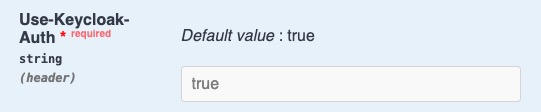
- optional field with api-version header should be left empty
Once ready, you can test the endpoints directly in Swagger (provided you have the necessary permissions).
How to get Access to the API
In order to get access to the API's of Adhese, you require a service account, your service account lets your backend system call the Adhese API without a user login. It uses the OAuth 2.0 client credentials flow: you exchange a client ID and secret for a short-lived access token, then include that token in every API request.
Prerequisites
Your Adhese support agent will provide:
-
Client ID — the identifier for your service account (e.g.
my-company-integration) - Client secret — treat this like a password; keep it out of source control
-
Realm — your Adhese realm name (e.g.
customer-name) - Region — determines the auth server URL (see below)
Token endpoint
POST https://auth.{region}.adhese.org/realms/{realm}/protocol/openid-connect/token
| Region | Value |
|---|---|
| Europe West | we |
| Central US | cus |
Getting a token
Send a POST request with Content-Type: application/x-www-form-urlencoded.
curl
curl -X POST \
  "https://auth.we.adhese.org/realms/customer-name/protocol/openid-connect/token" \
  -H "Content-Type: application/x-www-form-urlencoded" \
  -d "grant_type=client_credentials" \
  -d "client_id=my-customer-integration" \
  -d "client_secret=<your-secret>" \
  -d "scope=adhese-api"
Python
import requests

response = requests.post(
    "https://auth.we.adhese.org/realms/customer-name/protocol/openid-connect/token",
    data={
        "grant_type":    "client_credentials",
        "client_id":     "my-customer-integration",
        "client_secret": "<your-secret>",
        "scope":         "adhese-api",  # or "adhese-api ratecard"
    },
)
token = response.json()["access_token"]
Response
{
  "access_token": "eyJhbGciOiJSUzI1NiIsInR5...",
  "token_type": "Bearer",
  "expires_in": 300,
  "scope": "adhese-api"
}
Scopes
The scope parameter controls which permissions appear in your token. Your support agent configures which scopes are available to your service account.
| Scope | Use when |
|---|---|
adhese-api |
Calling the Adhese API |
ratecard |
Calling the Ratecard API |
To request multiple scopes, separate them with a space:
scope=adhese-api ratecard
Only request scopes for the APIs you will actually call. Roles for a scope you did not request will not appear in the token even if they were granted.
Token contents
The access token is a signed JWT. When decoded, it contains your granted permissions under permissions.adhese-api and/or permissions.ratecard:
{
  "permissions": {
    "adhese-api": [
      "booking:view",
      "campaign:view",
      "creative:view"
    ]
  }
}
The exact roles listed depend on what your support agent has configured for your service account.
Calling the API
Pass the token as a Bearer in the Authorization header of every request:
curl "https://api.adhese.org/..." \
  -H "Authorization: Bearer <access_token>"
Token expiry
Tokens expire after a while. Cache the token and reuse it across requests for its remaining lifetime. When it expires, request a new one using the same client credentials — the client credentials flow has no refresh token.
A simple approach: track the expires_in value from the token response, subtract a small buffer (e.g. 30 seconds), and request a new token when that time has elapsed.
Campaign API
Campaigns
Campaigns are a grouping of bookings and their associated creatives.
Create a campaign
POST /v1/campaignsCreates a new campaign.
Request body - CreateCampaignDto
| Field | Type | Required | Description |
|---|---|---|---|
name |
string | Yes | Display name of the company. |
advertiserId |
integer | No | ID of the advertiser/media partner you want to attach to this campaign. |
brandIds |
integer | No | IDs of the brands you want attached to this campaign. |
externalKey |
string | No | Your own external reference key. |
frequencyLimits |
integer, string | No | Frequency limit settings for the campaign. |
- amount |
integer | No | Limit of event per set period per scope. |
- event |
string | No | Set the limit to either IMPRESSIONS or CLICKS. |
- period |
string | No | Period for which the amount is applied as limit to the event. Either DAILY or HOURLY. |
- scope |
string | No | On which level the limit is applied. In this case always CAMPAIGN. |
priorityId |
integer | Yes | Priority of the campaign. 1 is the highest priority, with higher numbers representing lower priorities. By default clients have priorities 1 through 5 configured. |
campaignType |
string | Yes | Campaign type is either FULL for managed campaigns and, GUARANTEED or AUCTIONED for Self Service. In case of doubt with Self Service, pick GUARANTEED. |
reservationType |
string | Yes | Type of the campaign, either CAMPAIGN, OFFER, Option or DRAFT in the case of an Advendio campaign. |
deliveryFactors |
integer, string | No | Campaign goals expressed involume of unit, or in budget. |
- unit |
string | No | Unit of the to reach volume. Either IMPRESSIONS or CLICKS. |
- volume |
integer | No | Amount of unit to reach as campaign goal. |
- budget |
integer | No | Campaign budget that can be spend before the delivery stops |
internalNote |
string | No | Fills in the Internal ID |
externalKey |
string | No | Fills in the External ID |
publisherId |
integer | No | ID of the publisher you want to associate with the campaign. 1 is the main publisher |
Creating a Campaign
{
  "name": "Apitest",
  "poNumber": "95",
  "advertiserId": 1,
  "invoiceCompanyId": 1,
  "brandIds": [
    1
  ],
  "frequencyLimits": [
    {
      "amount": 1000,
      "event": "IMPRESSIONS",
      "period": "DAILY",
      "scope": "CAMPAIGN"
    }
  ],
  "priorityId": 1,
  "campaignType": "FULL",
  "reservationType": "CAMPAIGN",
  "deliveryFactors": {
    "unit": "IMPRESSIONS",
    "volume": 10000,
    "budget": 2000
  },
  "internalNote": "apitest",
  "externalKey": "testapi",
  "publisherId": 1
}
Response - 201
{
    "internalId": 21,
    "name": "Apitest",
    "lifetimeStatus": "INCOMPLETE",
    "startDate": null,
    "endDate": null,
    "budget": "2000.00",
    "bookingBudgetSum": "0",
    "volume": 10000,
    "toReachUnit": "IMPRESSIONS",
    "advertiser": 1,
    "advertiserName": "Philips",
    "invoiceCompany": 1,
    "invoiceCompanyName": "Philips",
    "brands": [
        1
    ],
    "mediaBrands": [
        {
            "id": 1,
            "name": "Evnia"
        }
    ],
    "status": "CAMPAIGN",
    "priority": 1,
    "origin": "OTHER",
    "type": "FULL",
    "frequencyLimits": [
        {
            "amount": 1000,
            "event": "IMPRESSIONS",
            "period": "DAILY",
            "scope": "CAMPAIGN"
        }
    ],
    "createdBy": 33,
    "creationDate": "2026-07-14T12:36:00Z",
    "lastEditedBy": null,
    "lastEditedDate": "2026-07-14T12:36:00Z",
    "externalKey": "testapi",
    "poNumber": "95",
    "validTill": null,
    "deliveryScheme": {
        "uniform": true
    },
    "message": null,
    "creativeCount": 0,
    "internalNote": "apitest",
    "publisherId": 1
}
Response codes
| Status | Meaning |
201 |
Campaign created. |
400 |
Bad request - invalid input or parameters. |
401 / 403 |
Not authenticated / not allowed. |
404 |
Not Found - Resource not found. |
409 |
Conflict. |
500 |
Internal Server Error - Unexpected failure. |
List campaigns
GET /v1/campaignsRetrieves a list of campaigns.
Request body - CampaignDto
| Parameter | In | Required | Type | Description |
InternalId |
path | Yes | integer | The campaign's ID. |
limit |
query | Yes | integer | Max number of results. |
offset |
query | Yes | integer | Results to skip. |
includeInactive |
query | No | boolean | Include deactivated brands. |
search |
query | No | string | URL-encoded, case-insensitive match on name. |
Response - 201
[
    {
        "internalId": 1,
        "name": "Example Display",
        "lifetimeStatus": "COMPLETED",
        "startDate": "2026-03-18T23:00:00Z",
        "endDate": "2026-04-30T21:59:59Z",
        "budget": "0.00",
        "bookingBudgetSum": "0.0",
        "volume": 0,
        "toReachUnit": "IMPRESSIONS",
        "advertiser": null,
        "advertiserName": null,
        "invoiceCompany": null,
        "invoiceCompanyName": null,
        "brands": [],
        "mediaBrands": [],
        "status": "CAMPAIGN",
        "priority": 1,
        "origin": "CLASSIC",
        "type": "FULL",
        "frequencyLimits": [],
        "createdBy": 2,
        "creationDate": "2026-03-19T13:46:14Z",
        "lastEditedBy": null,
        "lastEditedDate": "2026-03-19T13:46:14Z",
        "externalKey": null,
        "poNumber": "",
        "validTill": "1974-09-15T23:00:00Z",
        "deliveryScheme": {
            "uniform": true
        },
        "message": null,
        "creativeCount": 2,
        "internalNote": "",
        "publisherId": 1
    }
]
Response codes
| Status | Meaning |
200 |
Campaigns found. |
400 |
Bad request - invalid input or parameters. |
401 / 403 |
Not authenticated / not allowed. |
404 |
Not Found - Resource not found. |
500 |
Internal Server Error - Unexpected failure. |
Update campaigns
PUT /v1/campaigns/{campaignId}Update a single campaign.
Request body - CreateCampaignDto
| Field | Type | Required | Description |
|---|---|---|---|
name |
string | Yes | Display name of the company. |
advertiserId |
integer | No | ID of the advertiser/media partner you want to attach to this campaign. |
brandIds |
integer | No | IDs of the brands you want attached to this campaign. |
externalKey |
string | No | Your own external reference key. |
frequencyLimits |
integer, string | No | Frequency limit settings for the campaign. |
- amount |
integer | No | Limit of event per set period per scope. |
- event |
string | No | Set the limit to either IMPRESSIONS or CLICKS. |
- period |
string | No | Period for which the amount is applied as limit to the event. Either DAILY or HOURLY. |
- scope |
string | No | On which level the limit is applied. In this case always CAMPAIGN. |
priorityId |
integer | Yes | Priority of the campaign. 1 is the highest priority, with higher numbers representing lower priorities. By default clients have priorities 1 through 5 configured. |
campaignType |
string | Yes | Campaign type is either FULL for managed campaigns and, GUARANTEED or AUCTIONED for Self Service. In case of doubt with Self Service, pick GUARANTEED. |
reservationType |
string | Yes | Type of the campaign, either CAMPAIGN, OFFER, Option or DRAFT in the case of an Advendio campaign. |
deliveryFactors |
integer, string | No | Campaign goals expressed involume of unit, or in budget. |
- unit |
string | No | Unit of the to reach volume. Either IMPRESSIONS or CLICKS. |
- volume |
integer | No | Amount of unit to reach as campaign goal. |
- budget |
integer | No | Campaign budget that can be spend before the delivery stops |
internalNote |
string | No | Fills in the Internal ID |
externalKey |
string | No | Fills in the External ID |
publisherId |
integer | No | ID of the publisher you want to associate with the campaign. 1 is the main publisher |
Updating a campaign
{
  "name": "Apitest",
  "poNumber": "95",
  "advertiserId": 1,
  "invoiceCompanyId": 1,
  "brandIds": [
    1
  ],
  "frequencyLimits": [
    {
      "amount": 1200,
      "event": "IMPRESSIONS",
      "period": "DAILY",
      "scope": "CAMPAIGN"
    }
  ],
  "priorityId": 1,
  "campaignType": "FULL",
  "reservationType": "CAMPAIGN",
  "deliveryFactors": {
    "unit": "IMPRESSIONS",
    "volume": 10000,
    "budget": 2000
  },
  "internalNote": "apitest",
  "externalKey": "testapi",
  "publisherId": 1
}
Response - 200
{
    "internalId": 21,
    "name": "Apitest",
    "lifetimeStatus": "INCOMPLETE",
    "startDate": null,
    "endDate": null,
    "budget": "2000.00",
    "bookingBudgetSum": "0",
    "volume": 10000,
    "toReachUnit": "IMPRESSIONS",
    "advertiser": 1,
    "advertiserName": "Philips",
    "invoiceCompany": 1,
    "invoiceCompanyName": "Philips",
    "brands": [
        1
    ],
    "mediaBrands": [
        {
            "id": 1,
            "name": "Evnia"
        }
    ],
    "status": "CAMPAIGN",
    "priority": 1,
    "origin": "OTHER",
    "type": "FULL",
    "frequencyLimits": [
        {
            "amount": 1200,
            "event": "IMPRESSIONS",
            "period": "DAILY",
            "scope": "CAMPAIGN"
        }
    ],
    "createdBy": 33,
    "creationDate": "2026-07-14T12:36:00Z",
    "lastEditedBy": null,
    "lastEditedDate": "2026-07-15T13:31:14Z",
    "externalKey": "testapi",
    "poNumber": "95",
    "validTill": null,
    "deliveryScheme": {
        "uniform": true
    },
    "message": null,
    "creativeCount": 0,
    "internalNote": "apitest",
    "publisherId": 1
}
Response codes
| Status | Meaning |
200 |
Campaign updated. |
400 |
Bad request - invalid input or parameters. |
401 / 403 |
Not authenticated / not allowed. |
404 |
Not Found - Resource not found. |
409 |
Conflict. |
500 |
Internal Server Error - Unexpected failure. |
Delete campaigns
DELETE /v1/campaigns/{campaignId}(soft)delete Campaign by ID by (soft)deleting all its Bookings. Is limited by state (draft, or non-started auction).
Request
| Parameter | In | Required | Type | Description |
InternalId |
path | Yes | integer | The campaign's ID. |
Response codes
| Status |
Meaning |
204 |
Campaign deleted. |
400 |
Bad request - invalid input or parameters. |
401 / 403 |
Not authenticated / not allowed. |
404 |
Not Found - Resource not found. |
409 |
Conflict. |
500 |
Internal Server Error - Unexpected failure. |
Get a single campaign
GET /v1/campaigns/{campaignId}Retrieves information on a single campaign.
Request body - CampaignDto
| Parameter | In | Required | Type | Description |
InternalId |
path | Yes | integer | The campaign's ID. |
Response - 201
{
    "internalId": 17,
    "name": "Philips Evnia QD OLED",
    "lifetimeStatus": "COMPLETED",
    "startDate": "2026-07-04T22:00:00Z",
    "endDate": "2026-07-10T21:59:00Z",
    "budget": "6600.00",
    "bookingBudgetSum": "4500.0",
    "volume": 1500000,
    "toReachUnit": "IMPRESSIONS",
    "advertiser": null,
    "advertiserName": null,
    "invoiceCompany": null,
    "invoiceCompanyName": null,
    "brands": [],
    "mediaBrands": [],
    "status": "CAMPAIGN",
    "priority": 1,
    "origin": "MCB",
    "type": "FULL",
    "frequencyLimits": [
        {
            "amount": 200000,
            "event": "IMPRESSIONS",
            "period": "HOURLY",
            "scope": "CAMPAIGN"
        },
        {
            "amount": 500000,
            "event": "IMPRESSIONS",
            "period": "DAILY",
            "scope": "CAMPAIGN"
        }
    ],
    "createdBy": 1,
    "creationDate": "2026-07-01T09:35:02Z",
    "lastEditedBy": null,
    "lastEditedDate": "2026-07-01T09:35:02Z",
    "externalKey": null,
    "poNumber": null,
    "validTill": null,
    "deliveryScheme": {
        "uniform": true
    },
    "message": null,
    "creativeCount": 2,
    "internalNote": "1.000.000 impressies\n6000 euro budget",
    "publisherId": 1
}
Response codes
| Status | Meaning |
200 |
Campaign found. |
400 |
Bad request - invalid input or parameters. |
401 / 403 |
Not authenticated / not allowed. |
404 |
Not Found - Resource not found. |
500 |
Internal Server Error - Unexpected failure. |
Update campaign status
POST /v1/campaigns/{campaignId}/statusUpdate the status of a guaranteed campaign.
Changes only go in the following direction: draft -> offer (-> option) -> campaign
Any other changes to status (from example from draft to campaign) will result in an error.
Request Body - UpdateCampaignStatusRequest
| Parameter | Required | Type | Description |
status |
Yes | string | Status you want to change the campaign to. Options are DRAFT, OFFER, OPTION or CAMPAIGN |
message |
No | string | Message to attach to the status change. |
Changing a campaigns status
{
  "status": "OFFER",
  "message": "Apitest4"
}
Response - 200
{
    "internalId": 27,
    "name": "Apitest4",
    "lifetimeStatus": "PENDING",
    "startDate": "2026-07-19T22:00:00Z",
    "endDate": "2026-07-31T21:59:00Z",
    "budget": "0.00",
    "bookingBudgetSum": "1.0",
    "volume": 0,
    "toReachUnit": "IMPRESSIONS",
    "advertiser": 2,
    "advertiserName": "Logitech International S.A.",
    "invoiceCompany": null,
    "invoiceCompanyName": null,
    "brands": [
        2
    ],
    "mediaBrands": [
        {
            "id": 2,
            "name": "Logitech"
        }
    ],
    "status": "OFFER",
    "priority": 8,
    "origin": "MCB",
    "type": "GUARANTEED",
    "frequencyLimits": [],
    "createdBy": 30,
    "creationDate": "2026-07-20T13:01:12Z",
    "lastEditedBy": null,
    "lastEditedDate": "2026-07-22T07:40:52Z",
    "externalKey": null,
    "poNumber": "",
    "validTill": null,
    "deliveryScheme": {
        "uniform": true
    },
    "message": "Apitest4",
    "creativeCount": 0,
    "internalNote": "",
    "publisherId": 1
}
Response codes
| Status | Meaning |
200 |
Campaign status update. |
400 |
Bad request - invalid input or parameters. |
401 / 403 |
Not authenticated / not allowed. |
404 |
Not Found - Resource not found. |
422 |
Unprocessable entity (status change not allowed by business rules, see callout) |
500 |
Internal Server Error - Unexpected failure. |
Change the status of the bookings in a campaign
PATCH /v1/campaigns/{campaignId}/bookings/statusConditionally update the status of the bookings in a campaign.
Request body
| Parameter | Required | Type | Description |
| / | Yes | string | Status you want to change the bookings to. Options are ACTIVE, PAUSED, or STOPPED |
Change the status of a campaigns' bookings
"PAUSED"Response - 200
[
    28
]
Response codes
| Status | Meaning |
200 |
Booking status changed. |
400 |
Bad request - invalid input or parameters. |
401 / 403 |
Not authenticated / not allowed. |
404 |
Not Found - Resource not found. |
500 |
Internal Server Error - Unexpected failure. |
Get the booking shares of a campaign
GET /v1/campaigns/{campaignId}/booking-sharesRequest body - BookingShareDto
| Parameter | In | Required | Type | Description |
InternalId |
path | Yes | integer | The campaign's ID. |
Response - 200
[
    {
        "bookingId": 28,
        "share": 1.0
    }
]
Response codes
| Status | Meaning |
200 |
Booking share found. |
400 |
Bad request - invalid input or parameters. |
401 / 403 |
Not authenticated / not allowed. |
404 |
Not Found - Resource not found. |
500 |
Internal Server Error - Unexpected failure. |
Get list of campaign types visible to user
GET /v1/campaigns/filterValues/typesGet a unique list of campaign types for campaign filtering. Only values used in campaigns visible to the users are returned.
Response - 200
[
    "FULL",
    "GUARANTEED",
    "AUCTIONED"
]
Response codes
| Status | Meaning |
200 |
Booking share found. |
400 |
Bad request - invalid input or parameters. |
401 / 403 |
Not authenticated / not allowed. |
404 |
Not Found - Resource not found. |
500 |
Internal Server Error - Unexpected failure. |
Media Partners API
Media Partners
Media partners is the overarching term for an advertiser or debtor. Media partners have media brands associated with them.
Create a Media Partner
POST /v1/media-partners
Creates a media partner (advertiser company, invoicing company, or both, depending on roles).
Request body — CreateMediaPartnerRequest
| Field | Type | Required | Description |
|---|---|---|---|
name | string | Yes | Display name of the company. |
roles | array of enum | Yes | Any of ADVERTISER, INVOICE |
externalKey | string | No | Your own external reference key. |
subsystemExternalIds | object (string → string) | No | External ids per subsystem. Example is a CRM or Advendio ID. |
Create an advertiser company
{
  "name": "Acme Beverages",
  "roles": ["ADVERTISER"],
  "externalKey": "acme-bev",
  "subsystemExternalIds": {
    "crm": "CRM-10432"
  }
}
Create an invoicing company
{
  "name": "Acme Beverages Billing BV",
  "roles": ["INVOICE"],
  "externalKey": "acme-bev-billing"
}
Create a company that is both advertiser and invoicing party
{
  "name": "Acme Beverages",
  "roles": ["ADVERTISER", "INVOICE"]
}
Responses
| Status | Meaning |
|---|---|
201 | Media partner created. |
400 | Invalid input (e.g. empty `name` or unknown role). |
401 / 403 | Not authenticated / not allowed. |
500 | Unexpected failure. |
The
201response will return a body including the generatedidand all information known about the media partner.
List companies
GET /v1/media-partners?limit=50&offset=0
| Parameter | In | Required | Type | Description |
|---|---|---|---|---|
limit | query | Yes | integer | Max number of results to return. |
offset | query | Yes | integer | Number of results to skip. |
search | query | No | string | URL-encoded, case-insensitive match on name. |
roles | query | No | array | Filter on the role(s) the media partner has, e.g. `roles=ADVERTISER`. |
includeInactive | query | No | boolean | Include deactivated media partners. |
Response — array of MediaPartner Schema
[
  {
    "id": 4021,
    "name": "Acme Beverages",
    "roles": ["ADVERTISER"],
    "externalKey": "acme-bev",
    "subsystemExternalIds": { "crm": "CRM-10432" },
    "active": true
  }
]
Get a single media partner
GET /v1/media-partners/{mediaPartnerId}
| Parameter | In | Required | Type | Description |
|---|---|---|---|---|
mediaPartnerId | path | Yes | integer | The id of the media partner you want to fetch. |
Responses
| Status | Meaning |
|---|---|
200 | Media partner found. |
400 | Bad request -Invalid input or parameters. |
401 / 403 | Not authenticated / not allowed. |
404 | Media partner not found. |
500Internal Server Error
Update media partner
PUT /v1/media-partners/{mediaPartnerId}
| Parameter | In | Required | Type | Description |
|---|---|---|---|---|
mediaPartnerId | path | Yes | integer | The id of the media partner you want to update. |
Request body — UpdateMediaPartnerRequest
| Field | Type | Required | Description |
|---|---|---|---|
name | string | Yes | Media partner name. |
roles | string | No | Media partner role:INVOICE, ADVERTISER, INTERMEDIARY, MEDIA. |
subsystemExternalIds | object (string → string) | No | External ids per subsystem. |
Response
{
    "id": 1,
    "name": "Philips",
    "roles": [
        "ADVERTISER",
        "INVOICE"
    ],
    "externalKey": null,
    "subsystemExternalIds": {},
    "active": true
}
Deactivate a media partner
PATCH /v1/media-partners/{mediaPartnerId}/deactivate
| Parameter | In | Required | Type | Description |
|---|---|---|---|---|
mediaPartnerId | path | Yes | integer | The id of the media partner you want to deactivate. |
Check for deactivation by fetching the media partners and see if the deactivated media partner is removed from the list of media partners.
Responses
| Status | Meaning |
|---|---|
200 | Media partner deactivated. |
400 | Bad request - Invalid input or parameters. |
401 / 403 | Not authenticated / not allowed. |
404 | Resource not found. |
500Internal Server Error
Activate a media partner
PATCH /v1/media-partners/{mediaPartnerId}/activate
| Parameter | In | Required | Type | Description |
|---|---|---|---|---|
mediaPartnerId | path | Yes | integer | The id of the media partner you want to (re)activate. |
Check for activation by fetching the media partners and see if the reactivated media partner is added to the list of media partners.
Responses
| Status | Meaning |
|---|---|
200 | Media partner activated. |
400 | Bad request - Invalid input or parameters. |
401 / 403 | Not authenticated / not allowed. |
404 | Resource not found. |
500Internal Server Error
Create brands
A brand is a media brand that belongs to a media partner (typically the advertiser company). A brand can be present in multiple media partners.
Create a brand
POST /v1/media-partners/{mediaPartnerId}/brands
| Parameter | In | Required | Type | Description |
|---|---|---|---|---|
mediaPartnerId | path | Yes | integer | The media partner (company) the brand belongs to. |
Request body — CreateMediaBrandRequest
| Field | Type | Required | Description |
|---|---|---|---|
name | string | Yes | Brand name. |
externalKey | string | No | Your own external reference key. |
subsystemExternalIds | object (string → string) | No | External ids per subsystem. |
{
  "name": "Acme Cola",
  "externalKey": "acme-cola",
  "subsystemExternalIds": {}
}
Responses
| Status | Meaning |
|---|---|
201 | Media brand created. |
400 | Invalid input. |
401 / 403 | Not authenticated / not allowed. |
404 | Media partner not found. |
As with companies,
201will return a body including the generatedidand all information known about the brand.
List a company's brands
GET /v1/media-partners/{mediaPartnerId}/brands?limit=50&offset=0
| Parameter | In | Required | Type | Description |
|---|---|---|---|---|
mediaPartnerId | path | Yes | integer | The media partner. |
limit | query | Yes | integer | Max number of results. |
offset | query | Yes | integer | Results to skip. |
includeInactive | query | No | boolean | Include deactivated brands. |
search | query | No | string | URL-encoded, case-insensitive match on name. |
Response — array of MediaBrand Schema
[
  {
    "id": 8801,
    "name": "Acme Cola",
    "externalKey": "acme-cola",
    "subsystemExternalIds": {},
    "active": true
  }
]
Get a single brand
GET /v1/media-partners/{mediaPartnerId}/brands/{mediaBrandId}
| Parameter | In | Required | Type | Description |
|---|---|---|---|---|
mediaPartnerId | path | Yes | integer | The media partner. |
mediaBrandId | query | Yes | integer | The media brand. |
includeInactive | query | No | boolean | Include deactivated brands. |
search | query | No | string | URL-encoded, case-insensitive match on name. |
Response - Returns a single MediaBrand Schema.
{
    "id": 1,
    "name": "Evnia",
    "externalKey": "Evnia",
    "subsystemExternalIds": {},
    "active": true
}
Update a brand
PUT /v1/media-partners/{mediaPartnerId}/brands/{mediaBrandId}
| Parameter | In | Required | Type | Description |
|---|---|---|---|---|
mediaPartnerId | path | Yes | integer | The media partner. |
mediaBrandId | query | Yes | integer | The media brand. |
subsystemExternalIds | object (string → string) | No | integer | External ids per subsystem. Example is a CRM or Advendio ID. |
Response - Returns the updated brand information.
{
    "id": 1,
    "name": "Evnia",
    "externalKey": "Evnia",
    "subsystemExternalIds": {
        "subrandid": "tpvision"
    },
    "active": true
}
Deactivate a brand
PATCH /v1/media-partners/{mediaPartnerId}/brands/{mediaBrandId}/deactivate
| Parameter | In | Required | Type | Description |
|---|---|---|---|---|
mediaPartnerId | path | Yes | integer | The id of the media partner. |
mediaBrandIdpathYesintegerThe id of the brand you want to deactivate
Check for deactivation by fetching the brands and see if it is removed from the list of brands.
Responses
| Status | Meaning |
|---|---|
200 | Media brand deactivated. |
400 | Bad request - Invalid input or parameters. |
401 / 403 | Not authenticated / not allowed. |
404 | Resource not found. |
500Internal Server Error
Activate a brand
PATCH /v1/media-partners/{mediaPartnerId}/brands/{mediaBrandId}/activate
| Parameter | In | Required | Type | Description |
|---|---|---|---|---|
mediaPartnerId | path | Yes | integer | The id of the media partner. |
mediaBrandIdpathYesintegerThe id of the brand you want to (re)activate
Check for the brand reactivation by fetching the brands and see if it is added to the list of brands.
Responses
| Status | Meaning |
|---|---|
200 | Media brand activated. |
400 | Bad request - Invalid input or parameters. |
401 / 403 | Not authenticated / not allowed. |
404 | Resource not found. |
500Internal Server Error
User Mappings API
Connect users to media partners
A user mapping grants a user access to a company/brand combination. Each mapping entry requires an advertiserCompanyId and a brandId; invoiceCompanyId is optional.
Create a user mapping
POST /v1/user-mapping
Request body — CreateUserMappingRequest
| Field | Type | Required | Description |
|---|---|---|---|
user | string (1–255) | Yes | User identifier (e.g. email or username). |
mappings | array of `Mapping Schema` | Yes | At least one mapping entry. |
Mapping Schema
| Field | Type | Required | Description |
|---|---|---|---|
advertiserCompanyId | integer (≥ 1) | Yes | The advertiser company to grant access to. |
invoiceCompanyId | integer | No | Restrict the mapping to a specific invoicing company. |
brandId | integer (≥ 1) | Yes | The brand to grant access to. |
{
  "user": "jane.doe@partner.example",
  "mappings": [
    {
      "advertiserCompanyId": 4021,
      "invoiceCompanyId": 4022,
      "brandId": 8801
    }
  ]
}
Responses
| Status | Meaning |
|---|---|
201 | User mapping created. |
400 | Invalid input (e.g. missing `advertiserCompanyId` or `brandId`). |
401 / 403 | Not authenticated / not allowed. |
List users with mappings
GET /v1/user-mapping?limit=50&offset=0
| Parameter | In | Required | Type | Description |
|---|---|---|---|---|
limit | query | No | integer | Max results (≤ 100). |
offset | query | No | integer | Results to skip. |
search | query | No | string | Loose match on user identifier. |
advertiserCompanyId | query | No | integer | Only users mapped to this advertiser company. |
invoiceCompanyId | query | No | integer | Only users mapped to this invoice company. |
brandId | query | No | integer | Only users mapped to this brand. |
The response includes a Record-Count header with the total number of matches.
Response — array of UserMapping Schema
[
  { "user": "jane.doe@partner.example", "mappingCount": 3 }
]
List a single user's mappings
GET /v1/user-mapping/{user}
| Parameter | In | Required | Type | Description |
|---|---|---|---|---|
user | path | Yes | string | The user identifier. |
limit / offset | query | No | integer | Pagination. |
advertiserCompanyId | query | No | integer | Filter by advertiser company. |
invoiceCompanyId | query | No | integer | Filter by invoice company. |
brandId | query | No | integer | Filter by brand. |
Response — array of Mapping Schema
[
  {
    "advertiserCompanyId": 4021,
    "invoiceCompanyId": 4022,
    "brandId": 8801
  }
]
Delete a user mapping
DELETE /v1/user-mapping
Request body — DeleteUserMappingRequest
| Field | Type | Required | Description |
|---|---|---|---|
user | string (1–255) | Yes | The user identifier. |
advertiserCompanyId | integer (≥ 1) | — | Advertiser company of the mapping to remove. |
invoiceCompanyId | integer | — | Invoice company of the mapping to remove. |
brandId | integer (≥ 1) | — | Brand of the mapping to remove. |
{
  "user": "jane.doe@partner.example",
  "advertiserCompanyId": 4021,
  "invoiceCompanyId": 4022,
  "brandId": 8801
}
Responds 200 when the mapping is deleted.
API Manuals
Advertiser & Invoicing Companies, Brands, and User Mapping
This guide explains how to create advertiser companies, invoicing companies, and brands in Adhese through the Campaign API, and how to connect (map) users to those companies and brands.
All endpoints live under the Adhese API and are versioned with a /v1 prefix. The server base path is /api, so a full path looks like /api/v1/media-partners and /v1/user-mapping.
Key concepts & terminology
In Adhese, an advertiser company and an invoicing company are the same underlying entity — a media partner — distinguished by the roles assigned to it. A single media partner can hold one or more roles at the same time.
| You want to create… | What it is in the API | How |
|---|---|---|
| An advertiser company | A media partner with the ADVERTISER role |
POST /v1/media-partners with "roles": ["ADVERTISER"] |
| An invoicing company | A media partner with the INVOICE role |
POST /v1/media-partners with "roles": ["INVOICE"] |
| A company that is both | A media partner with both roles | POST /v1/media-partners with "roles": ["ADVERTISER", "INVOICE"] |
| A brand | A media brand that belongs to a media partner | POST /v1/media-partners/{mediaPartnerId}/brands |
| A user ↔ company/brand link | A user mapping | POST /v1/user-mapping |
Available roles: ADVERTISER, INVOICE
Note. The read-only endpoints
GET /v1/advertiser-companiesandGET /v1/brandsexpose the same entities from the campaign-booking perspective (used when creating or editing a campaign). Theiridvalues are the media-partner and media-brand ids you create below.
Authentication & headers
Every request is authenticated with a Bearer JWT and must carry the Keycloak auth header.
| Header | Required | Value | Notes |
|---|---|---|---|
Authorization |
Yes | Bearer <jwt> |
JWT access token. |
Use-Keycloak-Auth |
Yes | true |
Required on all /v1 endpoints. |
Content-Type |
For POST/DELETE with a body |
application/json |
— |
Example request line and headers:
POST /api/v1/media-partners
Authorization: Bearer eyJhbGciOiJSUzI1NiIsInR5cCI6IkpXVCJ9...
Use-Keycloak-Auth: true
Content-Type: application/json
Media Partners
Media partners is the overarching term for an advertiser or debtor. Media partners have media brands associated with them.
Create a Media Partner
POST /v1/media-partners
Creates a media partner (advertiser company, invoicing company, or both, depending on roles).
Request body — CreateMediaPartnerRequest
| Field | Type | Required | Description |
|---|---|---|---|
name | string | Yes | Display name of the company. |
roles | array of enum | Yes | Any of ADVERTISER, INVOICE |
externalKey | string | No | Your own external reference key. |
subsystemExternalIds | object (string → string) | No | External ids per subsystem. Example is a CRM or Advendio ID. |
Create an advertiser company
{
  "name": "Acme Beverages",
  "roles": ["ADVERTISER"],
  "externalKey": "acme-bev",
  "subsystemExternalIds": {
    "crm": "CRM-10432"
  }
}
Create an invoicing company
{
  "name": "Acme Beverages Billing BV",
  "roles": ["INVOICE"],
  "externalKey": "acme-bev-billing"
}
Create a company that is both advertiser and invoicing party
{
  "name": "Acme Beverages",
  "roles": ["ADVERTISER", "INVOICE"]
}
Responses
| Status | Meaning |
|---|---|
201 | Media partner created. |
400 | Invalid input (e.g. empty `name` or unknown role). |
401 / 403 | Not authenticated / not allowed. |
500 | Unexpected failure. |
The
201response will return a body including the generatedidand all information known about the media partner.
List companies
GET /v1/media-partners?limit=50&offset=0
| Parameter | In | Required | Type | Description |
|---|---|---|---|---|
limit | query | Yes | integer | Max number of results to return. |
offset | query | Yes | integer | Number of results to skip. |
search | query | No | string | URL-encoded, case-insensitive match on name. |
roles | query | No | array | Filter on the role(s) the media partner has, e.g. `roles=ADVERTISER`. |
includeInactive | query | No | boolean | Include deactivated media partners. |
Response — array of MediaPartner Schema
[
  {
    "id": 4021,
    "name": "Acme Beverages",
    "roles": ["ADVERTISER"],
    "externalKey": "acme-bev",
    "subsystemExternalIds": { "crm": "CRM-10432" },
    "active": true
  }
]
Get a single media partner
GET /v1/media-partners/{mediaPartnerId}
| Parameter | In | Required | Type | Description |
|---|---|---|---|---|
mediaPartnerId | path | Yes | integer | The id of the media partner you want to fetch. |
Responses
| Status | Meaning |
|---|---|
200 | Media partner found. |
400 | Bad request -Invalid input or parameters. |
401 / 403 | Not authenticated / not allowed. |
404 | Media partner not found. |
500Internal Server Error
Update media partner
PUT /v1/media-partners/{mediaPartnerId}
| Parameter | In | Required | Type | Description |
|---|---|---|---|---|
mediaPartnerId | path | Yes | integer | The id of the media partner you want to update. |
Request body — UpdateMediaPartnerRequest
| Field | Type | Required | Description |
|---|---|---|---|
name | string | Yes | Media partner name. |
roles | string | No | Media partner role:INVOICE, ADVERTISER, INTERMEDIARY, MEDIA. |
subsystemExternalIds | object (string → string) | No | External ids per subsystem. |
Response
{
    "id": 1,
    "name": "Philips",
    "roles": [
        "ADVERTISER",
        "INVOICE"
    ],
    "externalKey": null,
    "subsystemExternalIds": {},
    "active": true
}
Deactivate a media partner
PATCH /v1/media-partners/{mediaPartnerId}/deactivate
| Parameter | In | Required | Type | Description |
|---|---|---|---|---|
mediaPartnerId | path | Yes | integer | The id of the media partner you want to deactivate. |
Check for deactivation by fetching the media partners and see if the deactivated media partner is removed from the list of media partners.
Responses
| Status | Meaning |
|---|---|
200 | Media partner deactivated. |
400 | Bad request - Invalid input or parameters. |
401 / 403 | Not authenticated / not allowed. |
404 | Resource not found. |
500Internal Server Error
Activate a media partner
PATCH /v1/media-partners/{mediaPartnerId}/activate
| Parameter | In | Required | Type | Description |
|---|---|---|---|---|
mediaPartnerId | path | Yes | integer | The id of the media partner you want to (re)activate. |
Check for activation by fetching the media partners and see if the reactivated media partner is added to the list of media partners.
Responses
| Status | Meaning |
|---|---|
200 | Media partner activated. |
400 | Bad request - Invalid input or parameters. |
401 / 403 | Not authenticated / not allowed. |
404 | Resource not found. |
500Internal Server Error
Create brands
A brand is a media brand that belongs to a media partner (typically the advertiser company). A brand can be present in multiple media partners.
Create a brand
POST /v1/media-partners/{mediaPartnerId}/brands
| Parameter | In | Required | Type | Description |
|---|---|---|---|---|
mediaPartnerId | path | Yes | integer | The media partner (company) the brand belongs to. |
Request body — CreateMediaBrandRequest
| Field | Type | Required | Description |
|---|---|---|---|
name | string | Yes | Brand name. |
externalKey | string | No | Your own external reference key. |
subsystemExternalIds | object (string → string) | No | External ids per subsystem. |
{
  "name": "Acme Cola",
  "externalKey": "acme-cola",
  "subsystemExternalIds": {}
}
Responses
| Status | Meaning |
|---|---|
201 | Media brand created. |
400 | Invalid input. |
401 / 403 | Not authenticated / not allowed. |
404 | Media partner not found. |
As with companies,
201will return a body including the generatedidand all information known about the brand.
List a company's brands
GET /v1/media-partners/{mediaPartnerId}/brands?limit=50&offset=0
| Parameter | In | Required | Type | Description |
|---|---|---|---|---|
mediaPartnerId | path | Yes | integer | The media partner. |
limit | query | Yes | integer | Max number of results. |
offset | query | Yes | integer | Results to skip. |
includeInactive | query | No | boolean | Include deactivated brands. |
search | query | No | string | URL-encoded, case-insensitive match on name. |
Response — array of MediaBrand Schema
[
  {
    "id": 8801,
    "name": "Acme Cola",
    "externalKey": "acme-cola",
    "subsystemExternalIds": {},
    "active": true
  }
]
Get a single brand
GET /v1/media-partners/{mediaPartnerId}/brands/{mediaBrandId}
| Parameter | In | Required | Type | Description |
|---|---|---|---|---|
mediaPartnerId | path | Yes | integer | The media partner. |
mediaBrandId | query | Yes | integer | The media brand. |
includeInactive | query | No | boolean | Include deactivated brands. |
search | query | No | string | URL-encoded, case-insensitive match on name. |
Response - Returns a single MediaBrand Schema.
{
    "id": 1,
    "name": "Evnia",
    "externalKey": "Evnia",
    "subsystemExternalIds": {},
    "active": true
}
Update a brand
PUT /v1/media-partners/{mediaPartnerId}/brands/{mediaBrandId}
| Parameter | In | Required | Type | Description |
|---|---|---|---|---|
mediaPartnerId | path | Yes | integer | The media partner. |
mediaBrandId | query | Yes | integer | The media brand. |
subsystemExternalIds | object (string → string) | No | integer | External ids per subsystem. Example is a CRM or Advendio ID. |
Response - Returns the updated brand information.
{
    "id": 1,
    "name": "Evnia",
    "externalKey": "Evnia",
    "subsystemExternalIds": {
        "subrandid": "tpvision"
    },
    "active": true
}
Deactivate a brand
PATCH /v1/media-partners/{mediaPartnerId}/brands/{mediaBrandId}/deactivate
| Parameter | In | Required | Type | Description |
|---|---|---|---|---|
mediaPartnerId | path | Yes | integer | The id of the media partner. |
mediaBrandIdpathYesintegerThe id of the brand you want to deactivate
Check for deactivation by fetching the brands and see if it is removed from the list of brands.
Responses
| Status | Meaning |
|---|---|
200 | Media brand deactivated. |
400 | Bad request - Invalid input or parameters. |
401 / 403 | Not authenticated / not allowed. |
404 | Resource not found. |
500Internal Server Error
Activate a brand
PATCH /v1/media-partners/{mediaPartnerId}/brands/{mediaBrandId}/activate
| Parameter | In | Required | Type | Description |
|---|---|---|---|---|
mediaPartnerId | path | Yes | integer | The id of the media partner. |
mediaBrandIdpathYesintegerThe id of the brand you want to (re)activate
Check for the brand reactivation by fetching the brands and see if it is added to the list of brands.
Responses
| Status | Meaning |
|---|---|
200 | Media brand activated. |
400 | Bad request - Invalid input or parameters. |
401 / 403 | Not authenticated / not allowed. |
404 | Resource not found. |
500Internal Server Error
Connect users to media partners
A user mapping grants a user access to a company/brand combination. Each mapping entry requires an advertiserCompanyId and a brandId; invoiceCompanyId is optional.
Create a user mapping
POST /v1/user-mapping
Request body — CreateUserMappingRequest
| Field | Type | Required | Description |
|---|---|---|---|
user | string (1–255) | Yes | User identifier (e.g. email or username). |
mappings | array of `Mapping Schema` | Yes | At least one mapping entry. |
Mapping Schema
| Field | Type | Required | Description |
|---|---|---|---|
advertiserCompanyId | integer (≥ 1) | Yes | The advertiser company to grant access to. |
invoiceCompanyId | integer | No | Restrict the mapping to a specific invoicing company. |
brandId | integer (≥ 1) | Yes | The brand to grant access to. |
{
  "user": "jane.doe@partner.example",
  "mappings": [
    {
      "advertiserCompanyId": 4021,
      "invoiceCompanyId": 4022,
      "brandId": 8801
    }
  ]
}
Responses
| Status | Meaning |
|---|---|
201 | User mapping created. |
400 | Invalid input (e.g. missing `advertiserCompanyId` or `brandId`). |
401 / 403 | Not authenticated / not allowed. |
List users with mappings
GET /v1/user-mapping?limit=50&offset=0
| Parameter | In | Required | Type | Description |
|---|---|---|---|---|
limit | query | No | integer | Max results (≤ 100). |
offset | query | No | integer | Results to skip. |
search | query | No | string | Loose match on user identifier. |
advertiserCompanyId | query | No | integer | Only users mapped to this advertiser company. |
invoiceCompanyId | query | No | integer | Only users mapped to this invoice company. |
brandId | query | No | integer | Only users mapped to this brand. |
The response includes a Record-Count header with the total number of matches.
Response — array of UserMapping Schema
[
  { "user": "jane.doe@partner.example", "mappingCount": 3 }
]
List a single user's mappings
GET /v1/user-mapping/{user}
| Parameter | In | Required | Type | Description |
|---|---|---|---|---|
user | path | Yes | string | The user identifier. |
limit / offset | query | No | integer | Pagination. |
advertiserCompanyId | query | No | integer | Filter by advertiser company. |
invoiceCompanyId | query | No | integer | Filter by invoice company. |
brandId | query | No | integer | Filter by brand. |
Response — array of Mapping Schema
[
  {
    "advertiserCompanyId": 4021,
    "invoiceCompanyId": 4022,
    "brandId": 8801
  }
]
Delete a user mapping
DELETE /v1/user-mapping
Request body — DeleteUserMappingRequest
| Field | Type | Required | Description |
|---|---|---|---|
user | string (1–255) | Yes | The user identifier. |
advertiserCompanyId | integer (≥ 1) | — | Advertiser company of the mapping to remove. |
invoiceCompanyId | integer | — | Invoice company of the mapping to remove. |
brandId | integer (≥ 1) | — | Brand of the mapping to remove. |
{
  "user": "jane.doe@partner.example",
  "advertiserCompanyId": 4021,
  "invoiceCompanyId": 4022,
  "brandId": 8801
}
Responds 200 when the mapping is deleted.
End-to-end walkthrough
Create an advertiser company, an invoicing company, and a brand, then give a user access to them.
1. Create the advertiser company
POST /v1/media-partners

{
  "name": "Acme Beverages",
  "roles": ["ADVERTISER"],
  "externalKey": "acme-bev"
}
The response will give you its id → assume 4021.
2. Create the invoicing company
POST /v1/media-partners

{
  "name": "Acme Beverages Billing BV",
  "roles": ["INVOICE"],
  "externalKey": "acme-bev-billing"
}
The response will give you its id → assume 4022.
3. Create a brand under the advertiser company
POST /v1/media-partners/4021/brands

{
  "name": "Acme Cola",
  "externalKey": "acme-cola"
}
The response will give you its id → assume 8801.
4. Map the user to the company + brand
POST /v1/user-mapping

{
  "user": "jane.doe@partner.example",
  "mappings": [
    { "advertiserCompanyId": 4021, "invoiceCompanyId": 4022, "brandId": 8801 }
  ]
}
5. Verify the mapping
GET /v1/user-mapping/jane.doe@partner.example[
{ "advertiserCompanyId": 4021, "invoiceCompanyId": 4022, "brandId": 8801 }
]Error handling
Errors are returned as an RFC 7807 ProblemDetail object.
{
  "type": "about:blank",
  "title": "Bad Request",
  "status": 400,
  "detail": "roles must not be empty",
  "instance": "/api/v1/media-partners"
}| Status | Meaning |
|---|---|
400 |
Bad Request — invalid input or parameters. |
401 |
Unauthorized — authentication required or invalid token. |
403 |
Forbidden — authenticated but not allowed to access this resource. |
404 |
Not Found — resource not found. |
422 |
Unprocessable Entity — the request was understood but could not be processed. |
500 |
Internal Server Error — unexpected failure. |
Schema reference
CreateMediaPartnerRequest · MediaPartner Schema
{
  "id": 4021,
  "name": "string",
  "roles": ["ADVERTISER", "INVOICE", "INTERMEDIARY", "MEDIA"],
  "externalKey": "string",
  "subsystemExternalIds": { "subsystem": "externalId" },
  "active": true
}
CreateMediaBrandRequest · MediaBrand Schema
{
  "id": 8801,
  "name": "string",
  "externalKey": "string",
  "subsystemExternalIds": { "subsystem": "externalId" },
  "active": true
}
AdvertiserCompany Schema
{
  "id": 4021,
  "name": "string",
  "active": true,
  "externalId": "string",
  "subsystemExternalIds": { "subsystem": "externalId" }
}
Brand Schema
{ "id": 8801, "name": "string" }CreateUserMappingRequest Schema
{
  "user": "string",
  "mappings": [
    { "advertiserCompanyId": 4021, "invoiceCompanyId": 4022, "brandId": 8801 }
  ]
}
UserMapping Schema
{ "user": "string", "mappingCount": 3 }Booking API
Bookings
Bookings determine that what, where, how and when of ad delivery.
Get a single booking
GET /v1/bookings/{bookingId}Returns a single bookings' details by booking ID
Request body
| Parameter | In | Required | Type | Description |
InternalId |
path | Yes | integer | The booking's ID. |
Response - 200
{
    "internalId": 22,
    "name": "Evnia 27M2N8500/01",
    "status": "ACTIVE",
    "lifetimeStatus": "STARTED",
    "positionId": 8,
    "positionName": "Home Halfpage",
    "formatId": 1,
    "formatName": "Halfpage",
    "startDate": "2026-07-04T22:00:00Z",
    "endDate": "2026-07-31T21:59:00Z",
    "creationDate": "2026-07-01T10:14:28Z",
    "lastEditedDate": "2026-07-15T13:42:55Z",
    "deliveryFactors": {
        "unit": "IMPRESSIONS",
        "volume": 1500000,
        "pricingType": "CPM",
        "price": 3.0,
        "budget": 4500.0,
        "currency": "EUR",
        "cpcOptimized": true
    },
    "activeDays": [
        "MONDAY",
        "TUESDAY",
        "THURSDAY",
        "FRIDAY",
        "SATURDAY",
        "SUNDAY"
    ],
    "creativeCount": 2,
    "frequencyLimits": [],
    "userFrequencies": [
        {
            "impressionsAmount": 10,
            "expiryInSeconds": 86400
        }
    ],
    "pacing": "FRONTLOADED",
    "deliveryMethod": "AUTO",
    "deliveryParameter": 0.0,
    "deliveryMultiples": "FREE",
    "campaignId": 17,
    "comment": null,
    "priority": null,
    "isBookedOnChannel": false,
    "excludePositionIds": [],
    "excludePublicationIds": [],
    "rtbEnabled": false,
    "targetExpressions": {},
    "autoDeliveryLimits": false,
    "bookingType": null,
    "startTime": "00:00:00",
    "endTime": "23:59:59"
}
Response codes
| Status | Meaning |
200 |
Booking found. |
400 |
Bad request - invalid input or parameters. |
401 / 403 |
Not authenticated / not allowed. |
404 |
Not Found - Resource not found. |
500 |
Internal Server Error - Unexpected failure. |