This tracking feature requires a custom setup of your account. Contact Support if you wish to implement this feature.
Let's look at some examples of user actions. - **Within the ad environment** If Adhese serves a splash ad or interstitial, it is possible to track the visitor's behaviour. Does the visitor click outside the ad or the close button inside the ad to continue to the underlying webpage? - **Outside the ad environment** Adhese can also track events that occur outside the online advertisement environment. For instance, if a user clicks on your ad, Adhese can track their visit and determine if they made a purchase as a result of your advertising. This allows for more accurate attribution models, as many events can contribute to an online purchase or lead. ## Viewability Adhese has a tracker that can measure viewability if (legacy) document.write is used (see [Parameters for templates and Advar templates](https://documentation.adhese.org/books/templating/page/macros-for-templates-and-advar-templates)). If you use JSON, your logic can be implemented to measure viewability and then report it to Adhese via the **viewableImpressionCounter** parameter, which is available in the JSON response (see [List of JSON response structure object fields](https://documentation.adhese.org/books/integration-setup/page/json-endpoint-full-response-structure)). # Parameters A set of **parameters** accompanies every action or request. Parameters offer a greater insight into *who* is doing *what* and *where* and *how* these actions occur. The parameters consist of predefined data, such as screen size, browser and operating system, URL and referrer, or custom user data, such as age and geographic location. Custom parameters can be implemented based on your specific needs and possibilities. Refer to the [Request Target Parameters](https://documentation.adhese.org/books/integration-setup/page/reserved-target-prefixes) appendix for a list of readily available parameters. The available target parameters and their prefixes are determined by the configuration of your Adhese account. Adhese will use this information to build your inventory and provide insights to match campaigns with your audience and vice versa.Remember that the unique identification of visitors and the storage of personal and other data are subject to national, European and international legislation. It is the exclusive responsibility of the publisher to comply with the law and adequately inform the user of his rights. Adhese can help and advise publishers here. More on user privacy is available in the GDPR section of the documentation.
# Impression measurement Impression measurement is an essential aspect of ad serving. Understanding how and when Adhese counts an impression is important. There are two scenarios: 1. An ad is requested and visualised. 2. An ad is requested and could be visualised, depending on rules like minimal screen size, device rotation, viewport, etc. The impression is counted later (i.e., deferred impression). The second scenario results in two types of requests: - An **ad** request - A **track** request An ad request is a request that returns an ad, the first scenario. The second scenario executes a tracking request after the initial ad request. Therefore, it acts as an impression request.If you are using track requests to measure impressions, these numbers will build up your inventory. The actual inventory is reported and used in forecasting.
The above explanation about impression measurement applies to any tag (See [Implementation of the Adhese ad tags](https://documentation.adhese.org/books/inventory-management/page/how-to-deal-with-responsive-web-pages#bkmrk-the-implementation-o)). The [Campaign actions report per position](https://documentation.adhese.org/books/reporting/page/documents-tab-client-reports#bkmrk-campaign-actions-rep) reports the number of requests, tracks, and other events.Third-party discrepancies may arise when the publisher's report does not match the advertiser's report. Adhese counts an impression the moment the ad request is made, while the advertiser may count an impression when the ad is delivered to the user. For more information about third-party discrepancies, refer to Troubleshooting.
# Retention period of data Historical summarised data, such as daily unique visitors, is available anytime and can be archived at the client's request. The data can be accessed through reporting, data mining, our API, or on-demand as a custom report. However, there are some restrictions that you need to take into account: - *Legislation*: certain information cannot be saved or must be deleted after a short period. The unique identification of users and personal and other data storage is subject to national, European and international legislation. Adhese can assist and advise publishers in the matter. However, it is the exclusive responsibility of the publisher to comply with the law and adequately inform users of their rights. - *Common sense*: the amount of collected data can be huge for some (combinations of) parameters. You should consider whether storing such a large amount of data is necessary or desirable. The answer to this question will differ from client to client. Where there is a lot of data, it is often recommended that only aggregated data is maintained. Predictions are usually based on historical data. The type of data saved, the frequency of saving (whether daily, hourly, or otherwise), and the duration of storage depend on the client's needs and strategy. # BigQuery Reporting & Dataset Information ## Introduction [Adhese Gateway](https://documentation.adhese.org/books/gateway/page/adhese-gateway) (GW) logs all actions taken while receiving a request from a device and returning a response milliseconds later. This data is made available to the Gateway users through [BigQuery](https://cloud.google.com/bigquery/) (BQ) tables that contain results per day and are updated at midnight. The BQ tables are subject to change. Therefore, if you implement against them, you must be prepared to configure changes to the column structure. We will communicate planned changes prior to any deployments. However, we will not wait for every implementer to update. ## Access your Adhese data As a customer, you can access your data in three different ways, each suitable for a specific use case. These are briefly described below. - **Through a predefined Google Data Studio report** Standard Data Studio templates are available to connect to your data source. This gives you immediate insight without any additional development. - **Access to the Data Studio data source(s)** This allows you to create your own custom dashboards, which are useful for reporting on specific cases not covered by the standard dashboards. - **Direct access to the BigQuery table(s)** The more advanced option is to query the dataset(s) or export them directly. This requires some technical knowledge. If you would like to access your data in any of these ways, please contact [Adhese support](https://documentation.adhese.org/books/introduction/page/adhese-support) and provide a (Google) email address with which we can share access. ## Through a Google Data Studio template At Adhese, we offer a variety of predefined dashboards that provide immediate insights into your data. An example is shown below. [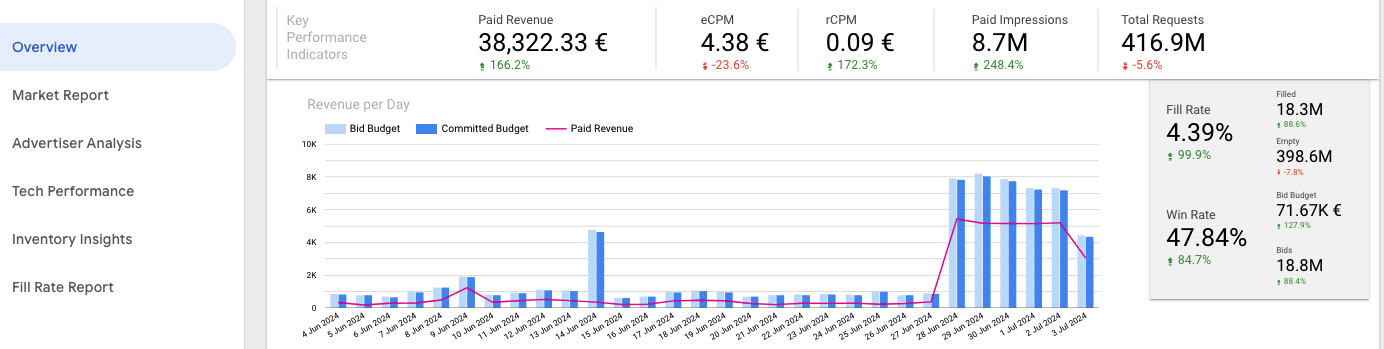](https://documentation.adhese.org/uploads/images/gallery/2024-07/AIBYuAdmYifKN93t-looker-studio.png) ## Access to the Data Studio data source(s) Another option is to get direct access to the underlying data sources. This method makes it possible to create any custom report or dashboard. When working with the data, it is important to understand the different columns and how to interpret them. ## Direct access to the BigQuery table(s) This is the more advanced option for your data team. It allows them to query the data sources directly or export the data to their own data solution. The following steps are required to access the BigQuery source: 1. Contact [Adhese support](https://documentation.adhese.org/books/introduction/page/adhese-support) and provide a Google email address connected to a [Google Cloud account](https://cloud.google.com/). We'll give the necessary permissions (BigQuery dataViewer, see role details [here](https://cloud.google.com/bigquery/docs/access-control#bigquery.dataViewer)). 2. Once access is provided, you can query the different tables.Ensure you are **within your own Google Cloud project**; otherwise, errors will be returned.
Ensure you use the correct data location; by default, this is **europe-west2**.
The table names are structured as follows: `adhese-cloud.${customer}.${table_name}` Where `${customer}` is your Adhese account name, and `${table_name}` is the table you are trying to query. See details about the different tables below. You can find your Adhese account name in the URL used to log in to the Adhese platform (e.g. [https://demo.adhese.org/](https://demo.adhese.org/)) A test query could look as follows: [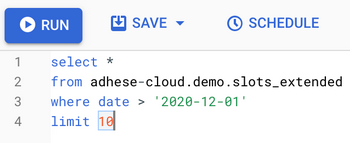](https://documentation.adhese.org/uploads/images/gallery/2024-06/p9yJCYBOKHGUN6XU-afbeelding.png) If this works, you should be able to use any [BigQuery functionality](https://cloud.google.com/bigquery/docs/query-overview) to further process your data. If you still have any questions, please don't hesitate to contact us at [Adhese support](https://documentation.adhese.org/books/introduction/page/adhese-support). ## Overview of Collected Data Two sets of data are collected during the lifetime of a single GW request/response: the **Media set** and the **Market set**. The Media set contains all the information about the request, including the device it originated from, the content associated with it, the user associated with it (if any), and so on. The exact attributes of the media set differ for each GW account, depending on the available data and the context configured for that account. The Market set contains the communication log between GW and the active markets for a given GW account. Market standards determine which attributes are available, though some are not available in all markets. The Market set contains all incoming bid responses from all active markets with advertiser and price information. ## Basic table schema [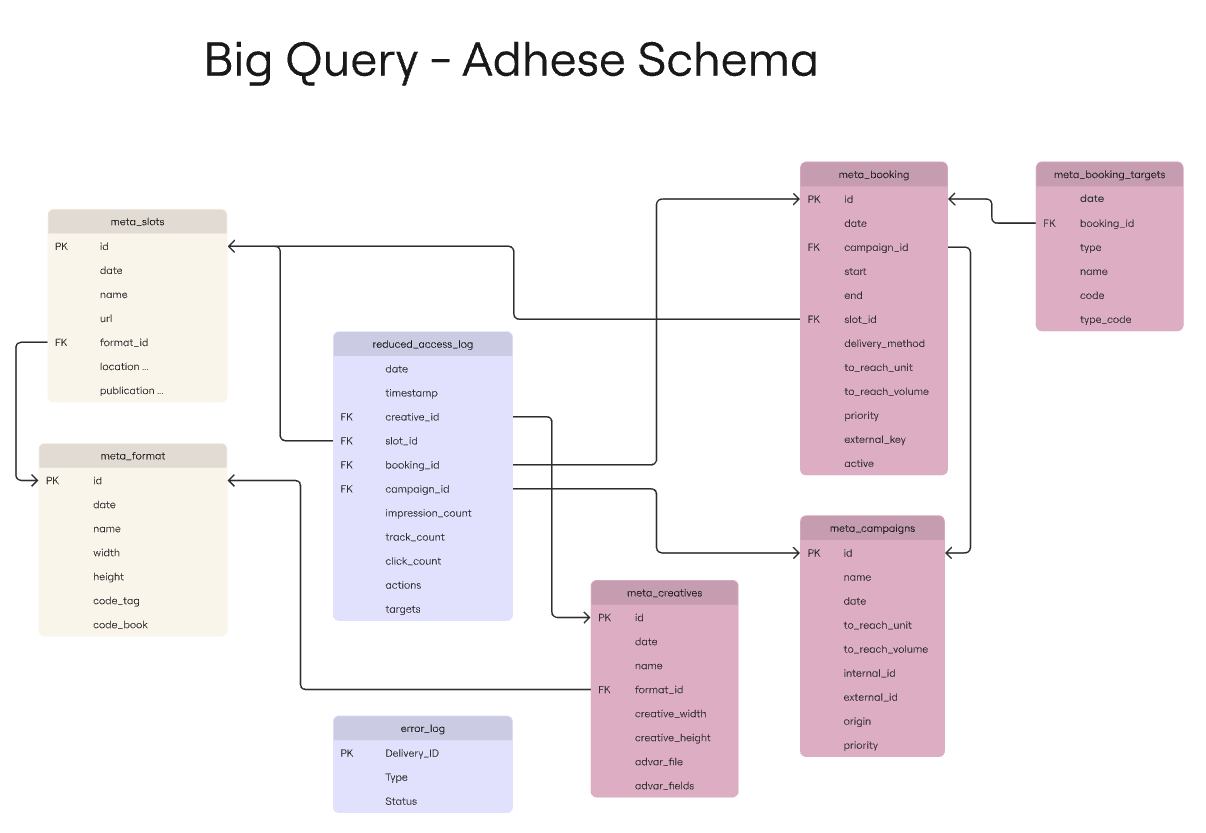](https://documentation.adhese.org/uploads/images/gallery/2026-01/Bl07xLtyesL9npM5-image.png) ## Table descriptions #### slots\_extended `adhese-cloud.${customer}.slots_extended` This table contains the Market data set. Each row contains the number of bid responses per day, aggregated in latency buckets of 10ms.| **Field name** | **Type** | **Mode** | **Description** |
| date | DATE | NULLABLE | The date on which these bid requests were received. |
| slot | RECORD | NULLABLE | |
| slot. id | INTEGER | NULLABLE | The ID of the slot the bid request was made from. |
| slot. code | STRING | NULLABLE | The code of the slot the bid request was made from. |
| publication | RECORD | NULLABLE | |
| publication. name | STRING | NULLABLE | The publication name in the Adhese dbase. |
| publication. url | STRING | NULLABLE | The publication URL in the Adhese dbase. |
| format | RECORD | NULLABLE | |
| format. name | STRING | NULLABLE | The format name in the Adhese database. |
| format. width | INTEGER | NULLABLE | The format width in pixels for this Bid Response. |
| format. height | INTEGER | NULLABLE | The format height in pixels for this Bid Response. |
| publisher | RECORD | NULLABLE | |
| publisher. name | STRING | NULLABLE | The name of this location in the Adhese dbase. |
| market | RECORD | NULLABLE | |
| market. name | STRING | NULLABLE | The market instance name as known in the Adhese configuration. |
| market. currency | STRING | NULLABLE | The currency this market uses for bid responses. |
| bid | RECORD | NULLABLE | |
| bid. count | INTEGER | NULLABLE | The number of bid responses for this record. |
| bid. amount | FLOAT | NULLABLE | The total value of the bid responses for this record in market.currency. |
| bid. winning | RECORD | NULLABLE | |
| bid.winning. count | INTEGER | NULLABLE | The number of winning bid responses for this record. |
| bid.winning. amount | FLOAT | NULLABLE | The total value of the winning bid responses for this record in market.currency. |
| bid. tracked | RECORD | NULLABLE | |
| bid.tracked. count | INTEGER | NULLABLE | The number of rendered bid responses for this record. (aka paid impressions) |
| bid.tracked. amount | FLOAT | NULLABLE | The total value of the rendered bid responses for this record in market.currency. |
| seatId | STRING | NULLABLE | The seat ID as known by this market. |
| domain | STRING | NULLABLE | The "OpenRTB domain" field, containing the domain of the advertising party or brand for this Bid Response. |
| dealId | STRING | NULLABLE | The deal ID as known by this market. |
| crId | STRING | NULLABLE | The creative ID as known by this market. |
| discountRate | FLOAT | NULLABLE | The value of the multiplier applied to this bid response. |
| exchangeRate | FLOAT | NULLABLE | The value of the exchange rate at the moment of the bid between market.currency and EUR. |
| latency | INTEGER | NULLABLE | The value of the latency bucket for these bids. |
| deviceType | STRING | NULLABLE | The label of the device that generated the bid request (phone, desktop, tablet, tv). |
| consent | BOOLEAN | NULLABLE | Indication of consent for the bid requests to this market. |
| **Field name** | **Type** | **Mode** | **Description** |
|---|---|---|---|
| date | DATE | NULLABLE | The date the request was made |
| timestamp | TIMESTAMP | NULLABLE | Timestamp (grouped per hour) on which the request was made |
| creative\_id | INTEGER | NULLABLE | The ID of the creative that was delivered |
| slot\_id | INTEGER | NULLABLE | The ID of the slot for which the request was made |
| booking\_id | INTEGER | NULLABLE | The ID of the booking that was delivered |
| campaign\_id | INTEGER | NULLABLE | The ID of the campaign that was delivered |
| impression\_count | INTEGER | NULLABLE | Each time an ad is requested, one impression is counted. This **does not** correspond to an IAB paid impression. |
| track\_count | INTEGER | NULLABLE | When an ad is rendered on a page, 1 track is counted. This corresponds to an IAB paid impression. |
| raw\_track\_count | INTEGER | NULLABLE | Raw amount of tracked impressions that were made before filtering out the duplicates |
| click\_count | INTEGER | NULLABLE | Each time a user clicks on an ad, 1 click is counted |
| raw\_click\_count | INTEGER | NULLABLE | Raw amount of clicks that were made before filtering out the duplicates |
| actions | STRING | REPEATED | A viewable impression is counted when a ‘Adhese\_IABview’ or 'mrc\_viewable' action is present. |
| targets | RECORD | REQUIRED | Contains the default and custom parameters that are set up. Contact the support team for more information about each field under targets. |
Extra information regarding slots (= positions) can be found [here](https://documentation.adhese.org/books/inventory-management/page/positions)
| **Field name** | **Type** | **Mode** | **Description** |
|---|---|---|---|
| date | DATE | NULLABLE | |
| id | INTEGER | NULLABLE | |
| name | STRING | NULLABLE | |
| url | STRING | NULLABLE | |
| position\_type | STRING | NULLABLE | position type as defined when creating a slot |
| template\_file | STRING | NULLABLE | |
| location\_id | INTEGER | NULLABLE | |
| location\_name | STRING | NULLABLE | |
| location\_url | STRING | NULLABLE | |
| location\_code | STRING | NULLABLE | |
| publication\_id | INTEGER | NULLABLE | |
| publication\_name | STRING | NULLABLE | |
| publication\_url | STRING | NULLABLE | |
| publisher\_id | INTEGER | NULLABLE | |
| publisher\_name | STRING | NULLABLE |
Extra information regarding formats can be found [here](https://documentation.adhese.org/books/inventory-management/page/formats)
| **Field name** | **Type** | **Mode** | **Description** |
|---|---|---|---|
| date | DATE | NULLABLE | |
| id | INTEGER | NULLABLE | |
| name | STRING | NULLABLE | |
| width | INTEGER | NULLABLE | |
| height | INTEGER | NULLABLE | |
| code\_tag | STRING | NULLABLE | Code used to request the format |
| code\_book | STRING | NULLABLE | Code used to link formats (subformat setup) |
| code\_import | STRING | NULLABLE |
Extra information regarding creatives can be found [here](https://documentation.adhese.org/books/campaign-management/page/creatives)
| **Field name** | **Type** | **Mode** | **Description** |
|---|---|---|---|
| date | DATE | NULLABLE | |
| id | INTEGER | NULLABLE | |
| name | STRING | NULLABLE | |
| type | STRING | NULLABLE | |
| format\_name | STRING | NULLABLE | |
| format\_width | INTEGER | NULLABLE | |
| format\_height | INTEGER | NULLABLE | |
| creative\_width | INTEGER | NULLABLE | |
| creative\_height | INTEGER | NULLABLE | |
| creative\_url | STRING | NULLABLE | |
| size\_kb | INTEGER | NULLABLE | size restriction if configured |
| advar\_fields | RECORD | REPEATED | advar template fields |
| advar\_file | STRING | NULLABLE | chosen advar template |
size\_kb does not contain the actual size of the uploaded files within the creative.
Extra information regarding bookings can be found [here](https://documentation.adhese.org/books/campaign-management/page/bookings)
| **meta\_booking** | **Description** | ||
|---|---|---|---|
| **Field name** | **Type** | **Mode** | |
| date | DAT | NULLABLE | |
| id | INTEGER | NULLABLE | |
| campaign\_id | INTEGER | NULLABLE | |
| slot\_id | INTEGER | NULLABLE | |
| start | TIMESTAMP | NULLABLE | |
| end | TIMESTAMP | NULLABLE | |
| delivery\_method | STRING | NULLABLE | |
| to\_reach\_unit | STRING | NULLABLE | e.g. impressions/clicks |
| to\_reach\_volume | INTEGER | NULLABLE | amount of units to reach |
| priority | STRING | NULLABLE | |
| capping | STRING | NULLABLE | |
| delivery\_limit | STRING | NULLABLE | |
| pricing\_type | STRING | NULLABLE | |
| unit\_price | FLOAT | NULLABLE | |
| external\_key | STRING | NULLABLE | |
| comment | STRING | NULLABLE | |
| daily\_start | INTEGER | NULLABLE | |
| daily\_end | INTEGER | NULLABLE | |
| exclusive | BOOLEAN | NULLABLE | |
| compete\_with\_rtb | BOOLEAN | NULLABLE | |
| together\_with | INTEGER | REPEATED | |
| active | RECORD | NULLABLE | |
| active.monday | BOOLEAN | NULLABLE | |
| active.tuesday | BOOLEAN | NULLABLE | |
| active.wednesday | BOOLEAN | NULLABLE | |
| active.thursday | BOOLEAN | NULLABLE | |
| active.friday | BOOLEAN | NULLABLE | |
| active.saturday | BOOLEAN | NULLABLE | |
| active.sunday | BOOLEAN | NULLABLE |
Extra information regarding campaigns can be found [here](https://documentation.adhese.org/books/campaign-management/page/campaigns)
| **Field name** | **Type** | **Mode** | **Description** |
|---|---|---|---|
| date | DATE | NULLABLE | |
| id | INTEGER | NULLABLE | |
| name | STRING | NULLABLE | |
| priority | STRING | NULLABLE | |
| created\_by | STRING | NULLABLE | |
| to\_reach\_unit | STRING | NULLABLE | e.g. impressions/clicks |
| to\_reach\_volume | INTEGER | NULLABLE | amount of units to reach |
| advertiser\_company | STRING | NULLABLE | |
| invoice\_company | STRING | NULLABLE | |
| media\_company | STRING | NULLABLE | |
| intermediary\_company | STRING | NULLABLE | |
| client\_contacts | STRING | NULLABLE | |
| internal\_id | STRING | NULLABLE | |
| external\_id | STRING | NULLABLE | |
| account\_managers | STRING | NULLABLE | |
| public\_comment | STRING | NULLABLE | |
| internal\_comment | STRING | NULLABLE |
Extra information regarding targeting can be found [here](https://documentation.adhese.org/books/inventory-management/page/targeting)
| **Field name** | **Type** | **Mode** | **Description** |
|---|---|---|---|
| date | DATE | NULLABLE | |
| booking\_id | INTEGER | NULLABLE | |
| type | STRING | NULLABLE | target name |
| type\_code | STRING | NULLABLE | target prefix |
| name | STRING | NULLABLE | target value name |
| code | STRING | NULLABLE | target value code |
| **Field name** | **Type** | **Mode** | **Description** |
|---|---|---|---|
| id | INTEGER | NULLABLE | |
| date | DATE | NULLABLE | The date on which these bid requests were received. |
| store\_city | STRING | NULLABLE | |
| store\_id | STRING | NULLABLE | |
| store\_formula | STRING | NULLABLE | Type of store. |
| store\_channel | STRING | NULLABLE | |
| store\_category | STRING | NULLABLE | |
| store\_latlong | STRING | NULLABLE | Latitudinal and longitudinal coordinates of the store. |
| store\_adress | STRING | NULLABLE | |
| store\_postal\_code | STRING | NULLABLE |
| **Field name** | **Type** | **Mode** | **Description** |
|---|---|---|---|
| date | DATE | NULLABLE | |
| error\_type | STRING | NULLABLE | |
| message | STRING | NULLABLE | |
| count | INTEGER | NULLABLE |
| SLOT\_ID\_UNKNOWN | The code of the requested position in the ad request does not match a position in Adhese |
CREATIVES_ID_TOO_LONG | The creative identifier in the click tracking URL is not a valid ID. |
| SLOT\_ID\_UNKNOWN | sl target could not be matched to a valid slot id |
XANDR_SLOT_ID_UNKNOWN | sl target could not be matched to a valid slot id and starts with xandr\_ |
BAD_CLICK_URL | An invalid value was found in the click url. Related to the click part, e.g. /ad695511-11419 |
BAD_TRACK_URL | An invalid value was found in the track url. Related to the track part, e.g. 581025-mrc\_50\_1s.track |
REQUEST_PARAMETER_DUPLICATE | e.g more than one sl parameter was found |
REQUEST_PARAMETER_MISSING | e.g no sl parameter was found |