# Browser debugging
Most - if not all - browsers contain dev tools where you can look up requests, data, code and check for errors.
# Network panel
The network panel will show all resources that are downloaded or uploaded the moment you visit a website. The most common use cases for Adhese users are:
- Making sure the necessary ad request(s) are being executed
- Inspecting the properties of an individual request, such as its HTTP headers, content, size, ...
- Inspecting the different positions that are being requested
- Inspecting the target data that is send together with the request
- Inspecting the ad response
- Making sure the user sync request is executed (not applicable to every setup)
- Making sure the impression, viewability and other custom trackers are executed as expected
Locating the Adhese requests could be done by filtering on the Adhese domain ([account].adhese.com). Many implementations however use custom first party domains instead which makes this more difficult.
### Locating the ad requests
As documented on the [request API page](https://documentation.adhese.org/books/integration-setup/page/request-api-json-endpoint-old) , there are 2 main endpoints that are used for requesting ads. They have the same use case but one is for GET requests and the other for POST requests.
Both of these endpoints can be found by filtering the requests on '**/json/**'. For GET requests all data will be part of the URL path itself while for POST requests all that data can be found under 'Payload'.
### Locating the track requests
Tracks can be found by filtering on '**/track/**'. We have 3 types of track requests:
1. Impression tracks: [domain]/track/[ad id]/sl[slot id]/...
2. Viewability tracks: [domain]/track/[ad id]-Adhese_IABview/sl[slot id]/...
3. Custom event tracks: [domain]/track/[ad id]-[custom value]/sl[slot id]/...
### Locating the user sync request
The user sync request can be found by filtering on 'user-sync.adhese.com'. The full URL is 'https://user-sync.adhese.com/iframe/user_sync.html'.
### Locating the pool requests
All materials and scripts are hosted on the pool domain which can be an Adhese domain (pool-[account].adhese.com) or a custom first party domain. The materials can be found by filtering on **'/pool/'** while scripts can be found by filtering on '**/tag/**'.
More information about this panel can be found on https://developer.chrome.com/docs/devtools/network (Blink), https://firefox-source-docs.mozilla.org/devtools-user/network_monitor/index.html (Gecko) and https://webkit.org/web-inspector/network-tab/ (Webkit)
# SDK implementations
Implementations that run on the Adhese SDK have 2 extra options for debugging.
### URL parameter
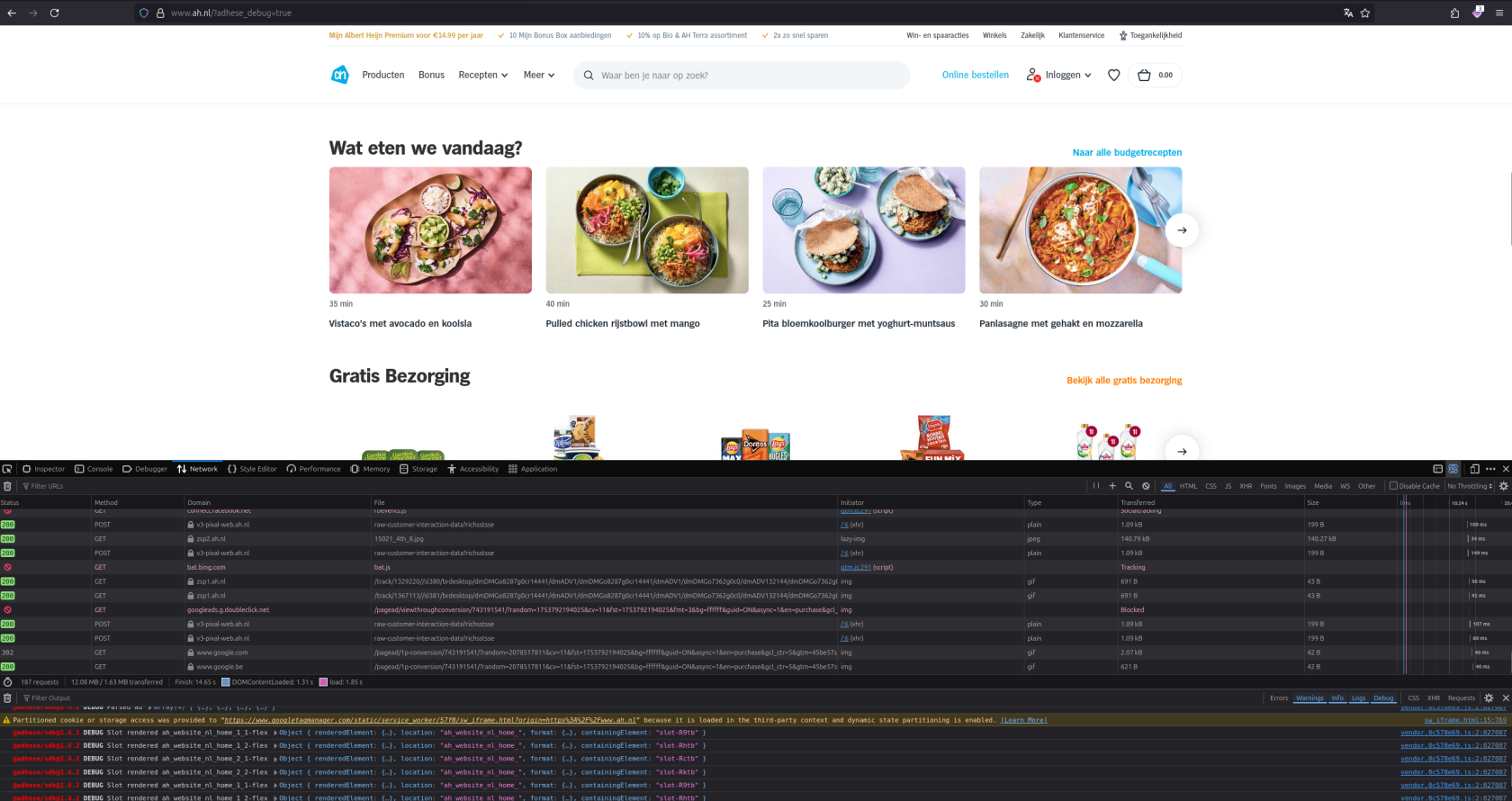
By adding "?adhese\_debug=true" to the URL of the page you can tell the SDK to print Adhese related messages in the browser console.
[](https://documentation.adhese.org/uploads/images/gallery/2025-07/Ph2v6JyhBEOxeTtt-schermafdruk-van-2025-07-29-14-30-28.png)
### Devtools
The SDK contains a devtools panel that can be used to show placement & banner data. These tools are however not enabled by default. To enable it please take a look at [https://adhese.github.io/sdk\_typescript/plugins/devtools.html.](https://adhese.github.io/sdk_typescript/plugins/devtools.html)