
Table columns in the Adhese interface
This page describes the table columns of the different screens within the interface of Adhese.
Campaign overview
Column name
Description
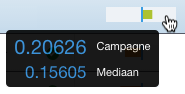
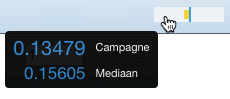
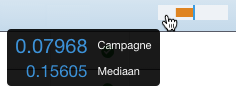
Advertiser company (Advertiser) The name of the advertiser Budget The available amount of money Campaign name The name of the campaign Clicks today Today's number of clicks Competing with RTB (RTB)Denotes whether the campaign competes with Real-Time Bidding revenue Created by The user who created the campaign in Adhese Creation date (Created) The date the campaign is created in Adhese Creatives status (C.) The creative status of the campaign indicates the number of uploaded creatives CTR vs benchmark (CTR/Benchmark) Compares the CTR of the campaign to the CTR of all other campaigns. This column presents a small horizontal bar chart with the median CTR of similar campaigns indicating the centre. The distance of the campaign CTR to the median is indicated by the coloured bar. See the following images for more information.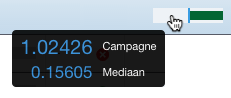
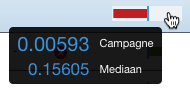
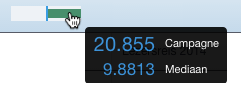
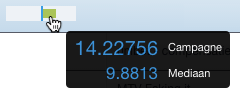
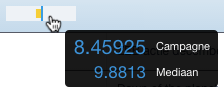
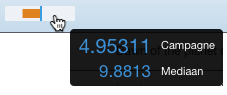
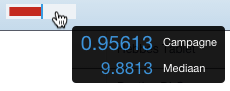
The Header status of a campaign denotes if there are any problems with the Campaign header, such as a missing value
Impressions today Today's number of impressions Intermediary company Name of the intermediate party Internal ID Internal ID of the campaign Invoice client company (Invoice client) The name of the company to whom the campaign is billed Last edited date (Last edited) The date the campaign is edited in Adhese for the last time Media company Name of the media company Priority The priority level of the campaign Progress status (Progr.) The Campaign progress status, the number of served impressions to the total number of desired impressions Reached clicks Total number of clicks already delivered Reached impressions (Reached impr.) Total number of impressions that are already served RTBA button is shown when one or more bookings are in competition with RTB revenue. The button is light blue if only a selection of the campaign's bookings is in competition. The button is dark blue if all campaign's bookings are in competition.Running status (Running) The status of the campaign denotes the health of a campaign's bookings Stars status (S.)The star status of a campaignTo date (To) The end date of the latest ending booking To reach unit (Unit) Unit of the campaign's objective To reach volume (Volume) The volume the campaign should reach Traffic status (Tr.) Summary of traffic statuses checks if everything is correct concerning the attachment of a booking to a creative Valid till The date until an option is validBooking overview
Column name
Description
Booked unit The unit of the booking's objective Clicks today Today's number of clicks Clicks/Impressions (CTR) The number of clicks as a percentage of the total number of impressions Competing with RTB (RTB)Signifies whether a booking is in competition with RTB revenue by denoting yes or no.
Creatives status (Cr.) Indicates the number of creatives that are attached to the booking Daily end time (End time) The daily end time of the booking Daily start time (Start time) The daily start time of the booking Delivery constraint (Constraint) The applied frequency cap Delivery method (Delivery) The chosen delivery method for a booking Delivery rate (DR) The number of impressions already served as a percentage of the expected impressions until now Effective CPM (eCPM) The effective cost per thousand impressions of the booking External key External key of the booking Format height The height (in pixels) of the format's dimension Format ID (Form. ID) The ID of the format Format name Name of the format Format width The width (in pixels) of the format's dimension From date (From) Delivery start date of the booking Gross price The gross price of the booking Impressions today Today's number of impressions Inventory share (SH) The percentage of the position's expected inventory that the booking takes up at the current hour of the day Location Name of the location Location ID (Loc. ID) The ID of the location Position Name of the booked position Position ID (Pos. ID) The ID of the booked position Price The unit price of the booking Pricing calculation unit (Pricing) The pricing type of the booking, such as CPM or CPC Publication Name of the publication Publication ID (Pub. ID) The ID of the publication Rate The applied commission percentage Reached clicks Total number of clicks already delivered Reached impressions (Reached) The number of impressions already served Running status (Running) The status of a booking denotes the health of a booking Stars status (S.)The star status of a bookingTargeting The applied targeting parameters To date (To) The delivery end date of the booking To reach volume (Booked) The volume the booking should reach Wave The ID of the rate where the commercial products belong toThe Wave functionality is client-specific.
Creative overview
Column name
Description
Clicks today Today's number of clicks Clicks/Impressions (CTR) The number of clicks as a percentage of the total number of impressions Format The type of format Format ID (Form. ID) The ID of the format Height The creative's height (in pixels) Impressions today Today's number of impressions Last modified The last time the creative was edited Name Name of the creative Size The file size of the creative Stars status (S.)The star status of a creativeWidth The creative's width (in pixels)Traffic tab
Column name
Description
#The ID of the bookingPositionPosition's name of the bookingTargetingTargeting properties of the bookingStartStart dateEndEnd dateExt. keyExternal key#The ID of the creativeNameName of the creativeFormatFormat of the creativeLast modifiedLast modification dateDelivery overview
Column name
Description
Booked unit The unit of the booking's objective Campaign Name of the campaign Campaign ID (#C.) The ID of the campaign Clicks/Impressions (CTR) The number of clicks as a percentage of the total number of impressions Competing with RTB (RTB)Signifies whether a booking is in competition with RTB revenue by denoting yes or no.
Creatives status (Cr.) Indicates the number of creatives that are attached to the booking CTR/benchmark The CTR of the booking is compared to the CTR of bookings booked at the same position. Daily end time (End time) The daily end time of the booking Daily start time (Start time) The daily start time of the booking Delivery constraint (Constraint) The applied frequency cap Delivery method (Delivery) The chosen delivery method for a booking Delivery rate (DR) The number of impressions already served as a percentage of the expected impressions eCPM/benchmark The eCPM of the booking is compared to the eCPM of bookings booked at the same position. Effective CPM (eCPM) The effective cost per thousand impressions of the booking External key External key of the booking Format height Height of the format's dimension (in pixels) Format ID (Form. ID) The ID of the format Format name (Format) Type of format Format width Width of the format's dimension (in pixels) From date (From) Delivery start date of the booking Gross price The gross price of the booking Inventory share (SH) The percentage of the position's expected inventory volume that the booking takes up at the current hour of the day Location Name of the location Location ID (Loc. ID) The ID of the location Position Name of the booked position Position ID (Pos. ID) The ID of the booked position Price The unit price of the booking Pricing calculation unit (Pricing) The pricing type of the booking, for example, CPM Priority The priority level of the campaign Publication Name of the publication Publication ID (Pub. ID) The ID of the publication Rate The applied commission percentage Reached clicks Total number of clicks already delivered Reached impressions (Reached) The number of impressions already served Running status (Running) The status of the booking denotes the health of the booking Stars status (S.)The star status of a bookingTargeting Applied targeting parameters To date (To) The delivery end date of the booking To reach volume (Booked) The volume of impressions or traffic the booking should reachInventory overview
Column name
Description
Campaign Name of the campaign Campaign ID (#C.) The ID of the campaign Cumulative impressions (Cumulative) The number of impressions (of a competitive booking with a higher campaign priority) that gets delivered first before the selected campaign will deliver Format ID (Form. ID) The ID of the format Format name (Format) Type of format From date (From) Start date of the booking's delivery Impressions Total number of impressions that are already served Location Name of the location Location ID (Loc. ID) The ID of the location Position ID (Pos. ID) The ID of the position Priority The priority level of the campaign Publication Name of the publication Publication ID (Pub. ID) The ID of the publication To date (To) The end date of the booking's deliveryRate cards
Administration screen
Rate cards screen
Column name
Description
NameName of the rate cardActiveStatus of the rate cardValid fromStart date of the rate card's validity periodValid tillThe end date of the rate card's validity periodRates screen
Column name
Description
UMA idA shortened code for a specific rate or tariff that is used as an agreement between agencies and publishersNameName of the rateFormatsFormats that belong to the rateUnitThe to reach unit, e.g., impressions or clicks, of the rate's objectivePricingThe pricing model, e.g., CPM or CPPTariffThe tariff of the pricing modelCommercial products table
Column name
Description
PublicationName of the publicationPositionName of the locationFormatName of the formatShareThe distribution of impressions relative to other commercial products within the rateTo Reach Unit (Unit)The objective's unit, e.g., clicks or impressionsMinimum volume (Min vol.)The minimum volume of impressions, clicks, etc., the commercial product should obtainMaximum volume (Max vol.)The maximum volume of impressions, clicks, etc., the commercial product should obtainDelivery method (Delivery)The chosen delivery method, e.g., AUTO or SOVDelivery parameter (Param.)The delivery percentage, if SOV is the delivery methodMinimum hours (Min h.) The minimum duration of the validity periodMaximum hours (Max h.)The minimum duration of the validity periodOffer and option screen
Financial tab
Table column
Description
Wave IDThe ID of the waveRateName of the rateUMA idA shortened code for a specific rate or tariff that is used as an agreement between agencies and publishersTariffThe applied tariff of the pricing modelPricingThe pricing model, e.g., CPM or CPPTime periodFor the CPP pricing model, the pricing time value and unitStart dateStart date of the campaignEnd dateThe end date of the campaignQuantityQuantity of the rateBudgetThe amount of the rate multiplied by the tariffAvailable rates table
Table column
Description
UMA idA shortened code for a specific rate or tariff that is used as an agreement between agencies and publishersNameName of the rateFormatFormats that belong to the rateTo Reach UnitThe to reach unit, e.g., impressions or clicks, of the rate's objectivePricingThe pricing model, e.g., CPM or CPPTariffThe applied tariff of the pricing modelTime valueFor the CCP pricing model, the pricing time valueTime unitFor the CCP pricing model, the pricing time unit, i.e., day or hoursAlerts
Alerting overview
Table column
Description
IDThe ID of the alertRecipientsPersons who will receive the alertNameName of the alertWhenWhen an alert is checkedTriggersWhat event triggers the alertMail template overview
Table column
Description
IDThe ID of the templateNameName of the mail templateUsesThe number of times the template is applied to an alert